I made a command line tool that lets you run an EYESY mode from your computer without having to run the hardware itself. When you run it, a pygame window pops on your computer to display your mode. I’m sharing it because I thought other people might find this useful for developing modes.
Here’s a link: GitHub - notmatthancock/eyesim: Simulator for EYESY visualizer
7 Likes
Thank you for your work. Could you explain how to run it for a noob?  tried to instal Pyhton 3.10.5 before the use but I’m encountering some difficulties.
Thanks
W.
Sure, there are general installation and usage instructions on the README of the github page. What sort of difficulties are you running into? You can also feel free to make an issue on the github repo with the error message and context.
2 Likes
I made something similar based on another post I saw on here if you’re interested GitHub - trev-rock/Eyesy: This repository is dedicated to the Critter and Guitar Eyesy device maybe we can collaborate!
2 Likes
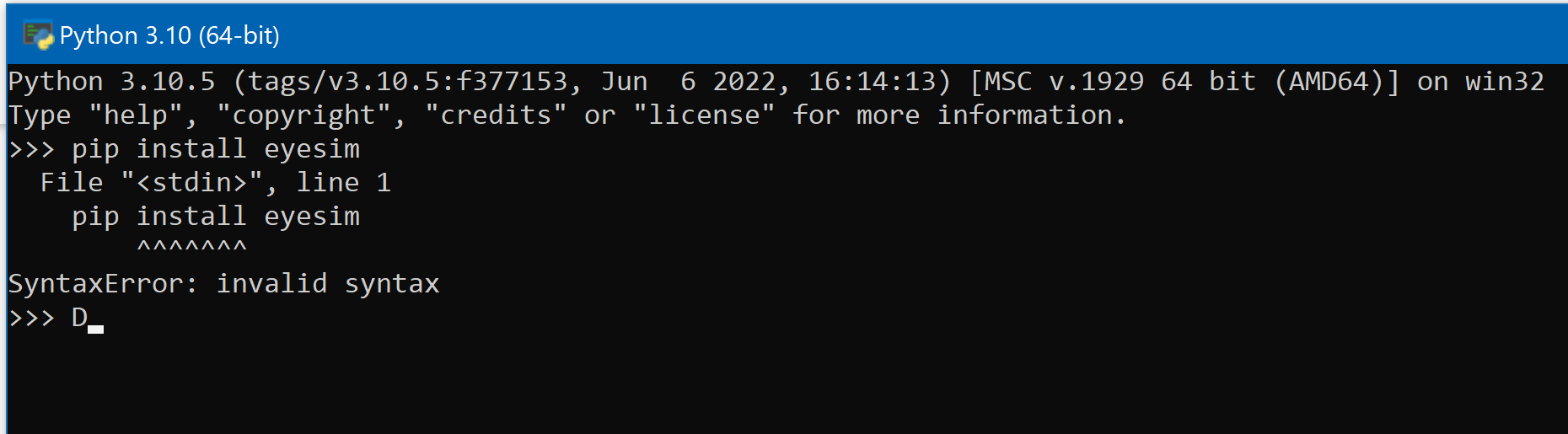
I’m sorry for my very noob request but I do not understand how to install pygame. I try to write the command: pip install eyesim
directly in the window of python
probably I’m wrong but I’m stuck in the first step

Sorry for the silly request.
You’re running pip from inside of Python. “pip install eyesim” is a shell command, and the Python REPL is expecting Python code. That’s why it yells at you about a SyntaxError because “pip install eyesim” isn’t valid Python code. You should run the install outside of python, i.e., in your command prompt, powershell, or whatever you use.
This is very cool! Has me thinking about installation possibilities. Is it possible to spin up a similar tool to have eyesy modes run on a raspberry pi with just an hdmi out?
Encountering some issues with getting scripts developed in the emulator back running on hardware. If anyone has any thoughts Id love to hear them.
Script Works locally in Emulator but not on Hardware - EYESY - Critter & Guitari (critterandguitari.com)
This is fantastic! It’s working great for me. I’m getting white on gray circles that are working rhythmically with the music.
I’d like to expand the visuals a bit. Maybe use a midi controller to tweak paramaters.
Any advice on beefing this up into something really crazy?
Hi there! My first post was actually looking for something just like this, so I was happy to find this thread.
But it seems the project is out of date, or I’m just doing something wrong. I’m unable to get eyesim to successfully install (Mac) and I’m getting the following error(s).
Collecting eyesim
  Using cached eyesim-0.0.3-py3-none-any.whl.metadata (3.0 kB)
Collecting pygame==2.1.2 (from eyesim)
  Using cached pygame-2.1.2.tar.gz (10.1 MB)
  Installing build dependencies ... done
  Getting requirements to build wheel ... error
  error: subprocess-exited-with-error

  × Getting requirements to build wheel did not run successfully.
  │ exit code: 1
  ╰─> [47 lines of output]


      WARNING, No "Setup" File Exists, Running "buildconfig/config.py"
      Using Darwin configuration...

      /bin/sh: sdl2-config: command not found
      /bin/sh: sdl2-config: command not found
      /bin/sh: sdl2-config: command not found

      ---
      For help with compilation see:
          https://www.pygame.org/wiki/MacCompile
      To contribute to pygame development see:
          https://www.pygame.org/contribute.html
      ---

      Traceback (most recent call last):
        File "/Library/Frameworks/Python.framework/Versions/3.13/lib/python3.13/site-packages/pip/_vendor/pyproject_hooks/_in_process/_in_process.py", line 389, in <module>
          main()
          ~~~~^^
        File "/Library/Frameworks/Python.framework/Versions/3.13/lib/python3.13/site-packages/pip/_vendor/pyproject_hooks/_in_process/_in_process.py", line 373, in main
          json_out["return_val"] = hook(**hook_input["kwargs"])
                                   ~~~~^^^^^^^^^^^^^^^^^^^^^^^^
        File "/Library/Frameworks/Python.framework/Versions/3.13/lib/python3.13/site-packages/pip/_vendor/pyproject_hooks/_in_process/_in_process.py", line 143, in get_requires_for_build_wheel
          return hook(config_settings)
        File "/private/var/folders/66/xbw0j8k1797bb8cld4_3bk680000gn/T/pip-build-env-focvy_qk/overlay/lib/python3.13/site-packages/setuptools/build_meta.py", line 334, in get_requires_for_build_wheel
          return self._get_build_requires(config_settings, requirements=[])
                 ~~~~~~~~~~~~~~~~~~~~~~~~^^^^^^^^^^^^^^^^^^^^^^^^^^^^^^^^^^
        File "/private/var/folders/66/xbw0j8k1797bb8cld4_3bk680000gn/T/pip-build-env-focvy_qk/overlay/lib/python3.13/site-packages/setuptools/build_meta.py", line 304, in _get_build_requires
          self.run_setup()
          ~~~~~~~~~~~~~~^^
        File "/private/var/folders/66/xbw0j8k1797bb8cld4_3bk680000gn/T/pip-build-env-focvy_qk/overlay/lib/python3.13/site-packages/setuptools/build_meta.py", line 522, in run_setup
          super().run_setup(setup_script=setup_script)
          ~~~~~~~~~~~~~~~~~^^^^^^^^^^^^^^^^^^^^^^^^^^^
        File "/private/var/folders/66/xbw0j8k1797bb8cld4_3bk680000gn/T/pip-build-env-focvy_qk/overlay/lib/python3.13/site-packages/setuptools/build_meta.py", line 320, in run_setup
          exec(code, locals())
          ~~~~^^^^^^^^^^^^^^^^
        File "<string>", line 359, in <module>
        File "/private/var/folders/66/xbw0j8k1797bb8cld4_3bk680000gn/T/pip-install-tqtiffsh/pygame_959b8046242a4dbfa93354a48424ed62/buildconfig/config.py", line 225, in main
          deps = CFG.main(**kwds)
        File "/private/var/folders/66/xbw0j8k1797bb8cld4_3bk680000gn/T/pip-install-tqtiffsh/pygame_959b8046242a4dbfa93354a48424ed62/buildconfig/config_darwin.py", line 132, in main
          [DependencyProg('SDL', 'SDL_CONFIG', 'sdl2-config', '2.0', ['sdl'])],
           ~~~~~~~~~~~~~~^^^^^^^^^^^^^^^^^^^^^^^^^^^^^^^^^^^^^^^^^^^^^^^^^^^^
        File "/private/var/folders/66/xbw0j8k1797bb8cld4_3bk680000gn/T/pip-install-tqtiffsh/pygame_959b8046242a4dbfa93354a48424ed62/buildconfig/config_unix.py", line 39, in __init__
          self.ver = config[0].strip()
                     ~~~~~~^^^
      IndexError: list index out of range
      [end of output]

  note: This error originates from a subprocess, and is likely not a problem with pip.
error: subprocess-exited-with-error

× Getting requirements to build wheel did not run successfully.
│ exit code: 1
╰─> See above for output.

note: This error originates from a subprocess, and is likely not a problem with pip.
Has anyone been able to get this working on a Mac? @Tom_Tolleson how did you do with the install?
Thanks!